

A0 Size Guide: Dimensions, Specs, and Exhibition Display Best Practices
A single pixelated graphic can undermine a £5,000 trade show investment in seconds. You understand that high-impact visuals are the backbone of a professional exhibition stand, yet technical errors like incorrect bleed or low resolution still affect 22% of large-format artwork submissions. We'll help you master the exact a0 size specifications and technical requirements to ensure your displays are crisp, professional, and perfectly fitted to your hardware.
Whether you're preparing a robust pavement sign or a seamless tension fabric display, getting the dimensions right is non-negotiable for a polished result. This guide provides the exact measurements you need in mm, cm, inches, and pixels to eliminate guesswork and avoid white edges. We'll also cover the specific exhibition hardware that accommodates this format and how to configure your files for a high-resolution finish that complements our tool-free assembly systems. By the end of this article, you'll have the technical confidence to manage your display setup and ensure your brand makes a lasting impact with a fast turnaround.
Key Takeaways
- Understand the ISO 216 standards and the "square metre" rule to ensure your a0 size graphics fit perfectly within international display frameworks.
- Learn how to balance high-resolution DPI with manageable file sizes to produce sharp, professional large-format prints that maintain clarity at scale.
- Identify when to scale up from A1 to A0 to maximise brand visibility and command attention in high-traffic exhibition environments.
- Apply the "less is more" design principle and expert typography standards to ensure your messaging remains legible and impactful from a distance.
- Evaluate the best mounting and illumination solutions, from tension fabric to lightboxes, to provide a robust and professional finish for your display.
What is A0 Size? Dimensions and Standards
Understanding the a0 size is the first step in planning a high-impact display for your next trade show or retail event. This format is the foundation of the ISO 216 standard, a system used globally to ensure consistency across the printing and manufacturing industries. While smaller formats like A4 are common in office environments, A0 is the heavy hitter of the exhibition world, designed specifically for maximum visibility and professional presence.
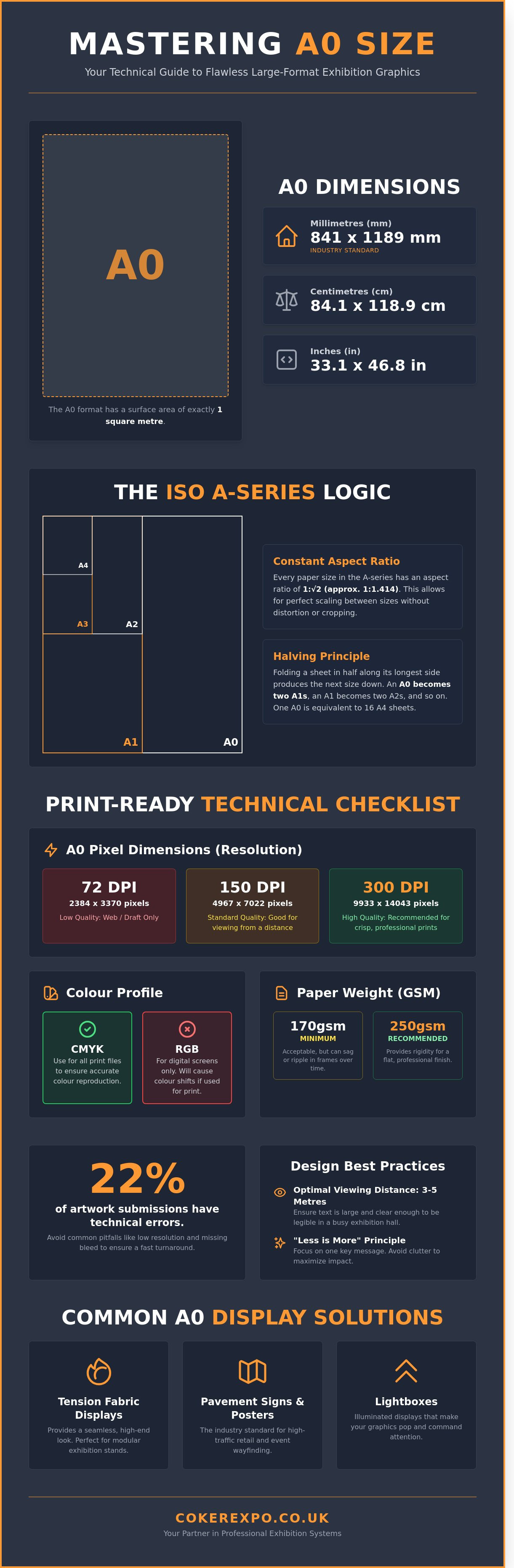
The most distinctive technical feature of the A0 format is the 'Square Metre' rule. An A0 sheet has a total surface area of exactly one square metre. This isn't just a mathematical quirk; it's a practical tool for marketing managers and production teams. If you're using 200gsm (grams per square metre) poster media, you know that a single A0 print will weigh exactly 200 grams. This precision allows for accurate shipping calculations and ensures your hanging displays don't exceed the load-bearing limits of your exhibition stand hardware.
Visualising the scale is easy when you compare it to standard office stationery. One A0 sheet is equivalent to 16 sheets of A4 paper. It provides 11,890 square centimetres of space for your branding, making it the preferred choice for technical drawings, site plans, and promotional posters. In a busy exhibition hall, an A0 display is legible from a distance of 3 to 5 metres, which is why it remains the industry standard for 85% of pavement signs and internal posters in UK retail spaces.
A0 Dimensions in Millimetres, Centimetres, and Inches
Precision is vital when ordering frames or custom-built lightboxes. The industry standard for a0 size is 841 x 1189 mm. If you're sourcing frames locally in the UK, you'll often see this listed as 84.1 x 118.9 cm. For international clients or those working with traditional imperial specifications, the measurements are 33.1 x 46.8 inches. We always recommend using millimetres for your artwork setup to ensure a seamless fit into our tool-free assembly display systems, as even a 2mm discrepancy can cause buckling in tension frames.
The Geometry of the A-Series
The entire A-series is built on a specific aspect ratio of 1:√2, roughly 1:1.414. This consistent ratio means you can scale your designs from an A4 flyer up to an A0 poster without cropping or distorting your graphics. When you fold an A0 sheet in half across its longest side, you get two A1 sheets. Fold it again, and you have A2. This logical progression is a lifesaver for designers working across multiple formats. It ensures that your brand identity remains robust and consistent, whether it's on a small desk-top sign or a massive, impactful wall display. Our UK-based production team relies on this geometric precision to deliver fast turnaround times on bespoke modular kits that require perfectly scaled graphics.
Technical Specifications for A0 Printing and Design
The a0 size is the foundation of high-impact exhibition graphics. It follows the international standard ISO 216, measuring exactly 841mm by 1189mm. While these dimensions are fixed, the technical execution of your digital file determines whether the final print looks professional or amateur. Large-format printing is unforgiving; a low-resolution logo that looks acceptable on a laptop screen will appear jagged and pixelated when scaled up to nearly 1.2 metres in height.
Designing at this scale demands significant processing power. A high-resolution A0 file at 300 DPI can easily exceed 500MB in size. We recommend using a workstation with at least 16GB of RAM to prevent software crashes during the export process. Beyond resolution, you must consider the physical "grammage" or GSM of your material. For a standard A0 poster, 170gsm is the absolute minimum weight. If you opt for anything lighter, the paper will likely sag or ripple under its own weight when placed in a clip frame. For premium displays, a 250gsm satin-finish paper provides the necessary rigidity to stay flat and professional throughout a three-day trade show.
Colour management is equally vital. Your design software must be set to the CMYK colour profile rather than RGB. Screens use light to create colours (RGB), whereas our printers use ink (CMYK). If you submit RGB files, you risk "colour shift," where vibrant blues on your monitor turn into dull purples on the printed board. You can browse our range of professional poster frames and mounts to ensure your technical precision is matched by high-quality hardware.
A0 Pixel Dimensions for High-Resolution Print
- 72 DPI (Web/Draft): 2384 x 3370 pixels. Avoid this for professional exhibition use as it results in visible blurring.
- 150 DPI (Standard Large Format): 4967 x 7016 pixels. This is the industry standard for banners viewed from a distance of one metre or more.
- 300 DPI (High Quality): 9933 x 14043 pixels. Use this gold standard for posters containing fine text or detailed product photography intended for close-up inspection.
Bleed, Crop Marks, and Safe Zones
Precision trimming is a mechanical process with a small margin for error. You must include a 3mm to 5mm bleed around the edge of your a0 size artwork. This ensures that the background colour or image extends beyond the trim line, preventing white slivers at the edges. Maintain a 10mm "safe zone" inside the trim line. Keep all essential text, logos, and contact details within this area to protect them from being cut off or obscured by the lip of a frame. In Adobe Illustrator or InDesign, set your artboard to 841 x 1189mm and define the bleed in the document setup to automate this process during PDF export.
A0 vs. Other Large Formats: Choosing the Right Scale
Selecting the correct a0 size for your display isn't just about filling space; it's about mastering the visual hierarchy of a busy trade hall. While the ISO 216 international standard for paper sizes provides a consistent framework, the jump from A1 to A0 represents a 100% increase in surface area. This doubling of the canvas allows for a significant boost in brand authority. When you move beyond A0 to "oversize" formats like 2A0 or 4A0, you're entering the territory of building wraps and high-level gantry banners. For most indoor exhibitors, A0 remains the upper limit for a single, manageable sheet of paper or card before the logistics require a transition to modular tension fabric systems.
The psychological impact of the A0 format is rooted in its scale relative to the human body. At 1189mm tall, an A0 poster occupies a dominant portion of an attendee's field of vision. This scale commands attention in a way that smaller formats cannot, making it the preferred choice for hero imagery. However, transport is a critical factor. An A0 print requires a 900mm protective tube and a dedicated carry strap. If your team is travelling via the London Underground or a busy train line, these physical dimensions require careful planning compared to smaller, A4-based modular literature. We often find that 75% of transport damage occurs when large-format prints aren't secured in rigid, professional-grade tubes.
When to Upgrade from A1 to A0
The decision to upgrade depends on the viewing distance of your audience. If your booth is positioned on a main thoroughfare where visitors are 5 metres away, an A1 poster will likely be ignored. An A0 display ensures that headlines remain legible from across the aisle. In terms of content, the a0 size comfortably accommodates 40% more technical data or high-resolution imagery than an A1 sheet without appearing cluttered. While a high-quality A0 satin print might cost approximately £35 to £55, the 100% increase in visibility offers a superior return on investment for high-traffic events.
Standard Poster Sizes in the UK Exhibition Industry
In the UK, the A0 format is a staple for research posters and site maps at major venues like the NEC or ExCeL London. Most exhibition stand designers integrate A0 dimensions into their initial CAD layouts because they fit perfectly within standard shell scheme panels. A typical UK shell scheme panel is 950mm wide; an A0 poster at 841mm wide leaves a clean 54.5mm border on either side. This creates a professional, framed appearance that avoids the messy look of posters overlapping the aluminium uprights. It's the safest choice for exhibitors who need a high-impact presence without the complexity of bespoke hardware.
- A0 Dimensions: 841 x 1189mm
- Best for: Hero brand imagery and detailed site maps
- Viewing Distance: Optimal for 3 to 6 metres
- Panel Fit: Ideal for 950mm or 1000mm UK shell scheme systems
Design Best Practices for A0 Exhibition Graphics
Designing for an A0 display requires a shift in perspective. The golden rule for large-format graphics is that less is always more. Overcrowding the 841mm x 1189mm canvas with excessive text ensures visitors will walk past without absorbing your message. Use whitespace strategically to create a visual path for the visitor; this negative space isn't wasted room, but a tool that directs the eye toward your most critical call to action. A clean layout projects a sense of professional authority and allows your core value proposition to breathe.
Legibility and Viewing Distances
High-contrast colour combinations, such as dark navy or black text on a light background, remain the most effective choice under the harsh, overhead LED lighting common in UK exhibition halls. The ideal viewing distance for A0 is between 1.5 and 3 metres for maximum clarity. To maintain legibility at this range, your typography must follow a strict hierarchy:
- Headlines: Minimum 72pt to 120pt for immediate impact.
- Subheadings: Minimum 48pt to guide the reader.
- Body Text: Minimum 24pt to ensure readability without straining.
Avoid light-weight or overly decorative fonts that disappear when viewed from the aisle. Stick to clean sans-serif typefaces for technical data or benefit-led copy to ensure your message is accessible to every passerby.
Vector vs. Raster Graphics for Large Format
Technical precision separates a professional display from a DIY attempt. Logos, icons, and diagrams should always be vector-based, using SVG, EPS, or AI files, to ensure they remain crisp regardless of how much they're scaled. Raster images, such as photography, present a different challenge. You cannot use 72 DPI images pulled from a website; they'll appear pixelated and blurry at a0 size, undermining your brand's credibility.
Ensure your photos are at least 300 DPI at 25% of the final print size, or 100 to 150 DPI at full scale, to maintain a sharp, impactful finish. Before sending your artwork to your exhibition partner, flatten your files to a high-quality PDF. This prevents font substitution errors or missing linked assets, ensuring a fast turnaround and a seamless production process. Using the a0 size correctly means balancing these high-resolution elements without creating a file so large it becomes unmanageable for print servers.
If you're ready to turn your designs into a robust, professional display, explore our range of exhibition stands and poster displays today.
Displaying A0 Graphics: Hardware and Mounting Solutions
Choosing the right hardware for a graphic of a0 size involves more than just finding a frame that fits. You have to decide between the structural rigidity of 5mm Foamex boards and the versatile portability of tension fabrics. While rigid boards are excellent for permanent wall mounts, they often require specialist couriers due to their 1189mm height. In contrast, tension fabric graphics fold down into a compact package, making them the preferred choice for exhibitors travelling to multiple UK events.
Safety is a non-negotiable factor. 98% of professional UK exhibition venues require proof of fire certification before you can install your display. Our A0 materials are tested to BS 5867 standards or European Class B-s1, d0, ensuring your brand stays compliant and your team stays safe during inspections at major hubs like the NEC or ExCeL London. Beyond safety, we focus on ease of use. Our hardware systems prioritises tool-free assembly, allowing a single staff member to build a professional-grade display in under 10 minutes without carrying a heavy toolkit.
Lightboxes and Fabric Frames
Integrating A0 graphics into exhibition lightboxes transforms a standard poster into a high-impact focal point that increases stand footfall by up to 40%. Tension Fabric Systems (TFS) allow for a seamless finish where the graphic stretches edge-to-edge across the frame. To avoid "hot spots" from internal LEDs, we use specific backlit fabrics with a high opaqueness rating and a built-in blockout layer. This ensures light diffuses evenly across the entire a0 size surface, providing a crisp, professional glow without any distracting shadows.
Portable Solutions for A0 Displays
You can use a pop up stand to support large-format visuals across multiple panels for a wider backdrop. For those requiring a traditional approach, folding display boards remain a robust choice for presenting A0 posters in educational or medical environments. These systems provide a double-sided display area that is both sturdy and easy to reposition. Because our hardware is made in the UK, we offer a 48-hour turnaround on many custom frames. This local production ensures that the aluminium extrusions and connectors meet strict quality control standards, providing a level of reliability that imported alternatives rarely match.
- Rigid Boards: Best for fixed wall displays and long-term durability.
- Tension Fabric: Ideal for frequent travel and a modern, "frameless" look.
- Illuminated Frames: Recommended for high-traffic areas to maximise brand visibility.
- Tool-Free Systems: Essential for reducing setup times and labour costs.
Maximise Your Exhibition Impact with Professional A0 Graphics
Mastering the a0 size format involves more than just understanding its 841mm by 1189mm dimensions. It requires a strategic combination of high-resolution design and the right hardware to ensure your message stands out in a busy hall. We've been perfecting our expert UK-based manufacturing since 1999 to provide the reliable infrastructure you need for a successful event. Our team understands that exhibition deadlines are often rigid; therefore, we offer fast turnaround on all large-format hardware to keep your schedule on track.
Every display system we produce prioritises the user experience. Our signature tool-free assembly ensures a stress-free exhibiting process, allowing you to focus on engaging with customers rather than struggling with complex equipment. You'll find that our robust, British-made frames provide the durability required for repeat use across multiple trade shows. It's about more than just a poster stand; it's about providing a professional platform that reflects your brand's quality. We're here to help you make a lasting impression.
Explore our range of professional A0-compatible exhibition displays
Frequently Asked Questions
What is the exact size of A0 in mm?
The exact dimensions of the A0 size are 841 x 1189 mm. This specific format covers exactly one square metre of surface area, following the ISO 216 international standard. For exhibition designers, these dimensions provide a robust canvas for high-impact graphics that remain clearly visible to attendees from a distance of 3 to 5 metres.
What is the best resolution for printing an A0 poster?
You should aim for a resolution of 300 DPI (dots per inch) for the highest quality, though 150 DPI is acceptable for posters viewed from a distance. At 300 DPI, your file needs to be 9,933 x 14,043 pixels. Providing high-resolution files ensures your brand graphics look sharp on a seamless exhibition stand rather than appearing pixelated under bright trade show lighting.
Can I print an A4 document as an A0 poster?
You can scale an A4 document to A0 size because they share the same 1:√2 aspect ratio, but you'll likely lose image quality. An A4 page is 1/16th the size of an A0 sheet. If your original file contains low-resolution raster images, they'll appear blocky when enlarged 1,600%. For a professional finish, always use vector-based PDF files created in software like Adobe Illustrator.
How much does an A0 sheet of paper weigh?
An A0 sheet of 80gsm paper weighs exactly 80 grams because the A0 size represents exactly one square metre. If you're using a more durable 250gsm silk material for a premium exhibition display, a single sheet will weigh 250 grams. Calculating these weights is essential for exhibitors who need to manage portable kit limits or calculate shipping costs for 50 or 100 units.
What is the difference between A0 and 'Poster Size'?
A0 is a standardised international dimension of 841 x 1189 mm, while "poster size" is a generic term that often refers to 20 x 30 inches or 24 x 36 inches. In the UK exhibition industry, A0 is the professional standard for technical drawings and large-format displays. Using a standardised size ensures your graphics fit perfectly into off-the-shelf snap frames and modular display systems.
What font size should I use for an A0 poster?
Use a minimum font size of 24pt for body text and 72pt to 120pt for main headlines to ensure readability from 2 metres away. For exhibition graphics, your primary message should be legible to attendees walking past at a speed of 1 metre per second. We recommend sans-serif fonts like Helvetica or Arial for maximum clarity, ensuring your key value propositions are absorbed instantly by visitors.
Is A0 the same as 30x40 inches?
No, A0 is not the same as 30 x 40 inches; it's larger, measuring approximately 33.1 x 46.8 inches. A 30 x 40 inch board is a common UK imperial size often used in retail, but it's 14% smaller in total area than a standard A0 sheet. Always check your frame dimensions before printing, as using the wrong format will result in gaps or require manual trimming of your display graphics.
Do I need bleed for an A0 exhibition graphic?
You must include a 3mm to 5mm bleed on all sides of your artwork to account for cutting tolerances during the finishing process. This extra margin prevents unsightly white edges from appearing if the blade shifts slightly during trimming. For large-format exhibition panels, providing a press-ready PDF with crop marks and a 5mm bleed ensures a seamless fit within our robust gantry or modular wall systems.
Leave a comment